Skip to content
Management software for marinas and boatyards, free and commission-free
Features

The whole marina in one program.

From the pier map to the dock, from contract to payment, from the shed to the boatyard: here is what Porto does, module by module. Every feature is described in the manager’s guide (in Italian).

Harbour map

A to-scale harbour map, seen through different lenses

Quays, piers, fingers, buoy fields, yards, sheds, parking and boxes, measured in centimetres. The same map shows occupancy, contract type, presence, payments, due dates, berth rights, maintenance, sensors and utilities.
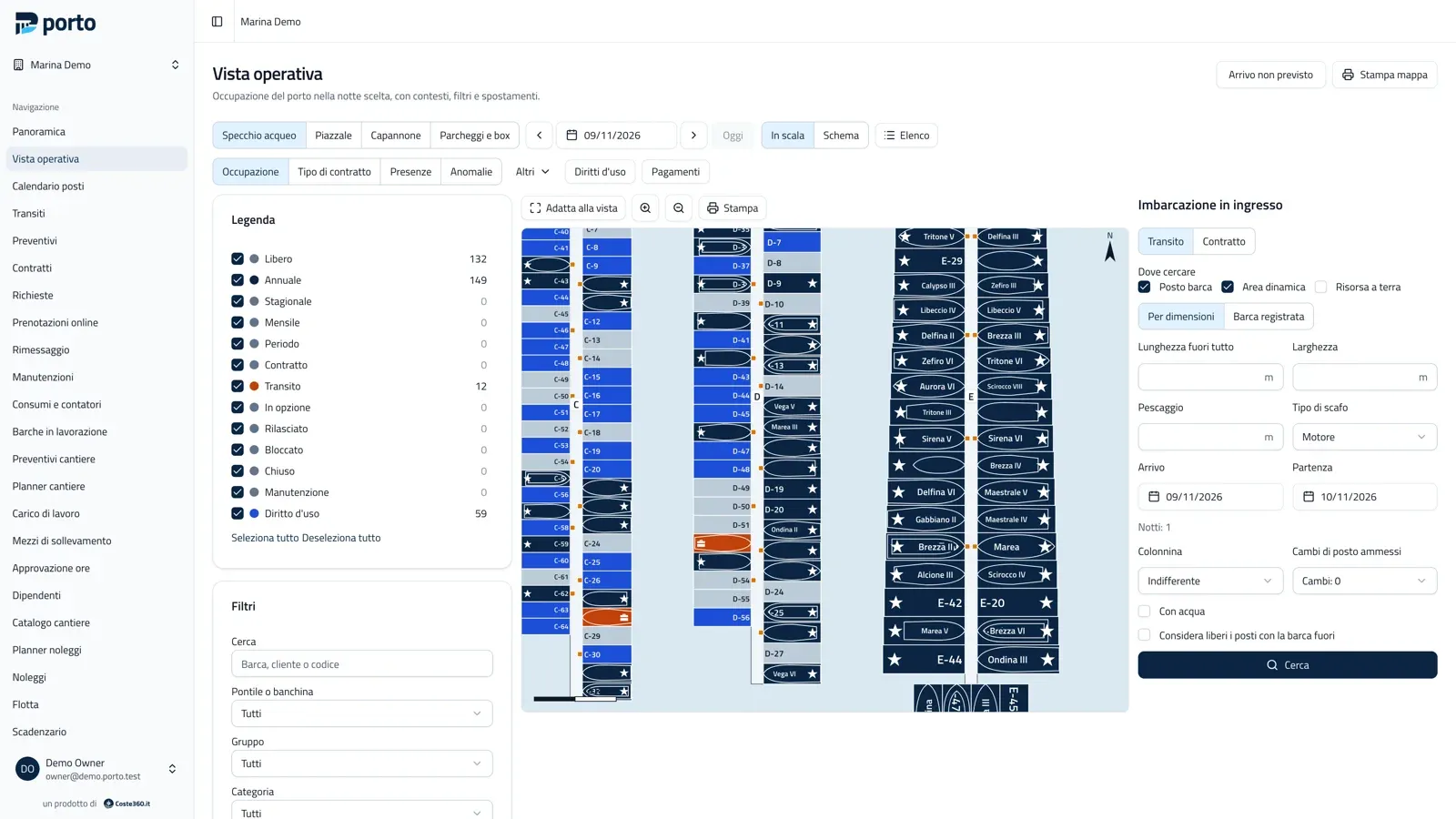
Operational view: piers C, D and E to scale with berths coloured by occupancy and the legend with counts.
Operational view to scale, Occupancy lens
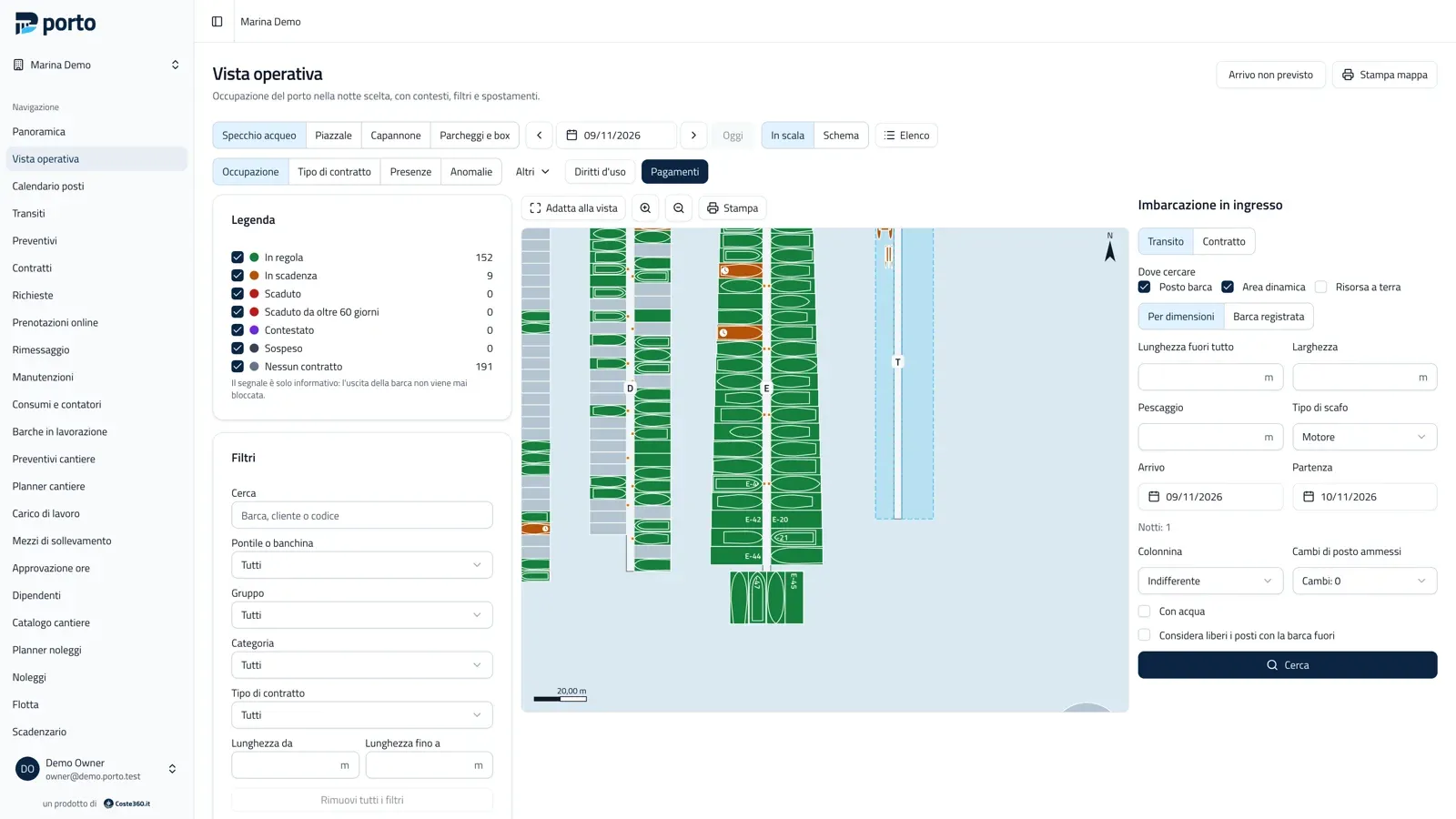
The same map in the Payments lens, with berths coloured by the customer’s payment status.
The same map in the Payments lens
  • Editor and generators

    Piers with berths on one or both sides, fingers, mooring blocks, grid buoy fields, sheds in cells, over a calibrated orthophoto or site plan.

  • Dynamic areas

    A pier side or a quay where boats moor alongside by length, with drag and drop, swaps and compaction.

  • Berth search

    By length, beam, draught and hull type, with a fit check and the price from the price list.

  • To scale or as a schema

    Tiles readable without an orthophoto, light and dark themes, map printing and an accessible list.

  • No double occupancy

    Two boats in the same space on the same night are prevented by database constraints.

  • CSV import

    Import berths from a spreadsheet, with groups and price categories assigned in bulk.

Customers and boats

Customers and boats, with documents and due dates

Customer and vessel records with owners and other parties, documents with the file attached, due dates and consents.

  • Encrypted documents

    ID, licence and insurance with the file attached; documents and IBANs encrypted, files downloadable only through short-lived links.

  • Due dates

    Documents, policies and contracts about to expire, with reminders.

  • Duplicates and GDPR

    Merge duplicates, versioned consents, customer data export and anonymisation on request.

  • Messages

    Emails to customers filtered by group, pier or map selection, respecting consents, through your own mail server.

Price lists

Price lists and prices, always computed the same way

Rate periods, length bands, calculation bases, splitting rules, surcharges, included and extra services, discounts, VAT, rounding and deposits.

  • Simulator and matrix

    The price of every combination before you activate the list; the matrix prints.

  • Versioned price lists

    An active price list never changes: every price can be recomputed.

  • Price list renewal

    Next year’s list starts from this one, with a comparison of the differences.

  • Coverage check

    Checks that every berth category has a price in every period.

Contracts

Mooring contracts, transits and renewals

Annual, seasonal, monthly and period contracts, transits, dry-storage and charter contracts. From quote to signature, with instalments and a schedule.

  • From quote to contract

    Sent by email with PDF and link, accepted online by the customer, signed on paper, by OTP or on screen.

  • Transits

    Quotes with up to three options, berths held as options, arrivals, departures, presence and the berth calendar.

  • Renewals and campaigns

    Single renewals or renewal campaigns for every contract, addenda, boat changes and a waiting list.

  • Print templates

    Contracts and documents from your own templates, with merge fields, generated as PDF.

Berth rights

Berth rights, fees and common charges

For marinas with berths held under rights of use: holders and shares, transfers signed in sequence, management mandates with the revenue accrued to the holder.

  • Holders and transfers

    Who holds the right on each berth, with shares and the transfer history.

  • Common charges

    Running costs, apportionment tables, budgets and splits on account and at balance, exact to the cent.

  • Management mandates

    The marina lets the berth on the holder’s behalf and credits the revenue accrued.

  • Concession

    The marina’s state concession data, close at hand.

Charges and payments

Charges and payments. Invoices come from your own software.

Porto does not issue invoices: it computes charges and exports them “to invoice” for the invoicing software you or your accountant already use.

Porto does not issue invoices

It sends nothing to the Italian e-invoicing exchange (SdI) and it is not a fiscal cash register: the courtesy receipts it prints are non-fiscal. The tax setup remains the responsibility of the marina and its adviser.

  • “To invoice” export

    CSV, Excel or PDF: every charge lands in an export exactly once.

  • Exported charges are immutable

    Once exported a charge never changes: every correction is a linked adjustment.

  • Invoice reconciliation

    Import the invoices issued outside Porto and link them to the charges.

  • Payments and payment requests

    Matching, refunds, deposits, SEPA mandates, payment links through your own Stripe account or by bank transfer and cash.

  • Statements and reminders

    Receivables by age and tiered reminders, with approval of the final notice.

  • Cash desk

    Opening, closing and Z report, counter sales, courtesy receipts and daily takings for the accountant.

Dry storage

Dry storage: sheds and yards to scale, with the optimizer

Indoor and outdoor storage contracts, cradles and stands, haul-out and launch dates. The planner shows the plan to scale with the timeline below.
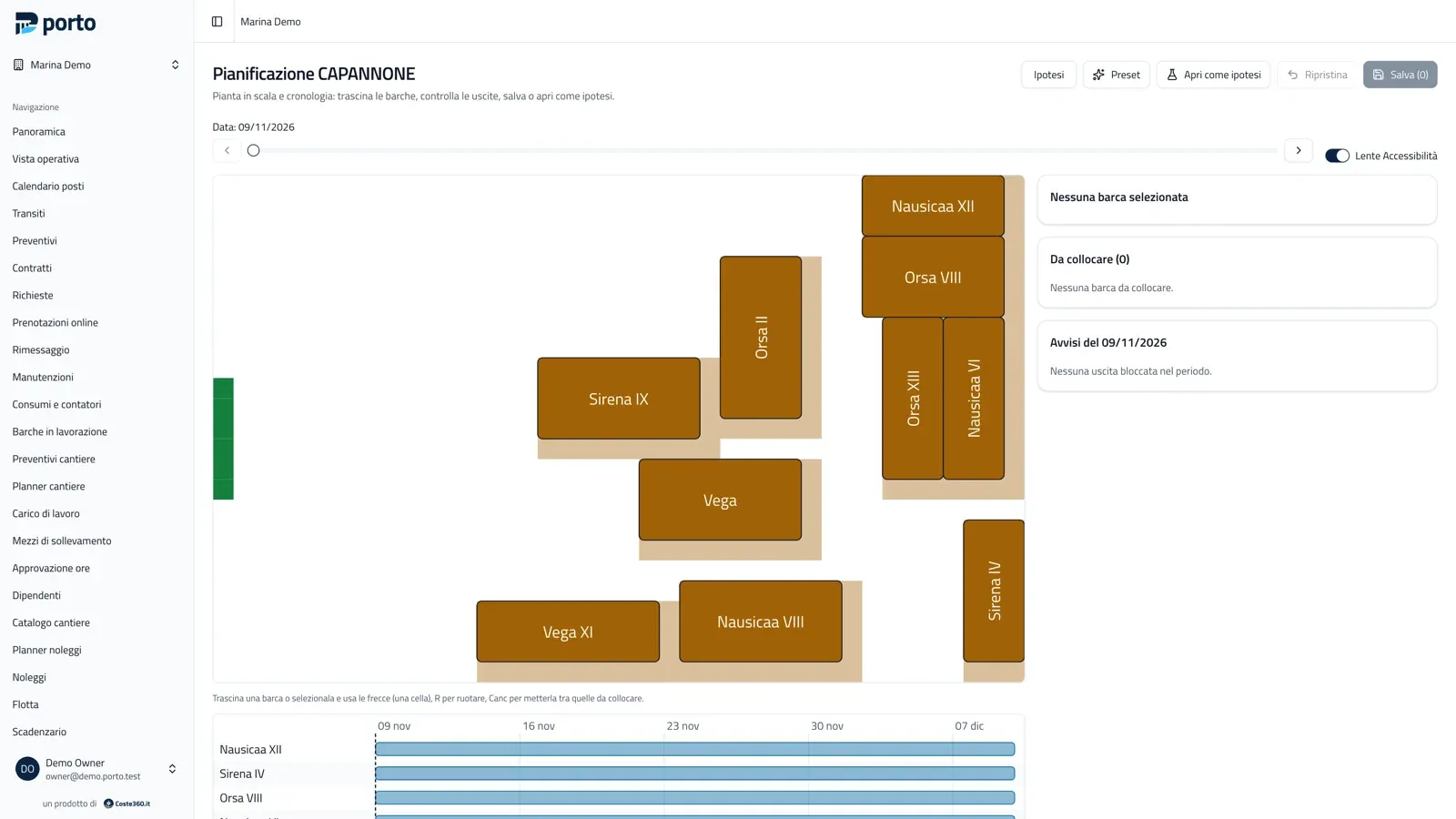
Planning a dry-storage shed to scale, with draggable boats, the exit accessibility lens and the timeline below the plan.
The shed plan with the exit accessibility lens
  • Drag and rotate

    Keyboard too; scenarios stay apart from the real state until you apply them.

  • Optimizer

    Places boats so that each one can leave through the door on its planned day; you apply all of it or nothing.

  • Maintenance

    Scheduled by months, cycles or date, with outcome, costs, photos and out-of-service resources.

  • Utilities

    Meters on pedestals and resources, readings from the phone even offline, consumption charged exactly once.

Boatyard

Boatyard: quotes, work orders and lifting

A catalogue of jobs with formulas (for example the hull area from the boat’s dimensions), packages, skills and rates from the price lists.

  • Guided quote

    No hand-typed prices; the customer accepts it from a link and the work order starts with tasks and a deposit.

  • Hours and materials

    Hours with a timer, from the phone and offline too, approval, materials, external costs with mark-up.

  • Final account

    Revenue, costs and margin of every work order.

  • Lifting equipment

    Travel lift, crane, forklift and trailer booked in slots, never overlapping; planner and workload per employee.

Rentals

Boat rentals, run from the phone

The fleet is linked to the boats, with skippers and hourly, half-day, daily, multi-day and weekly rates, plus extras.

  • Planner

    By unit and hour, bookings as options or confirmed; never two bookings for the same unit or skipper.

  • Handover and return

    From the phone: ID and licence, contract signed on screen, checklist, fuel, damage with photos.

  • Deposits and quick payment

    Deposit in cash, by card terminal or pre-authorisation, and quick payment from the phone.

Online booking

Online berth booking, with no commission

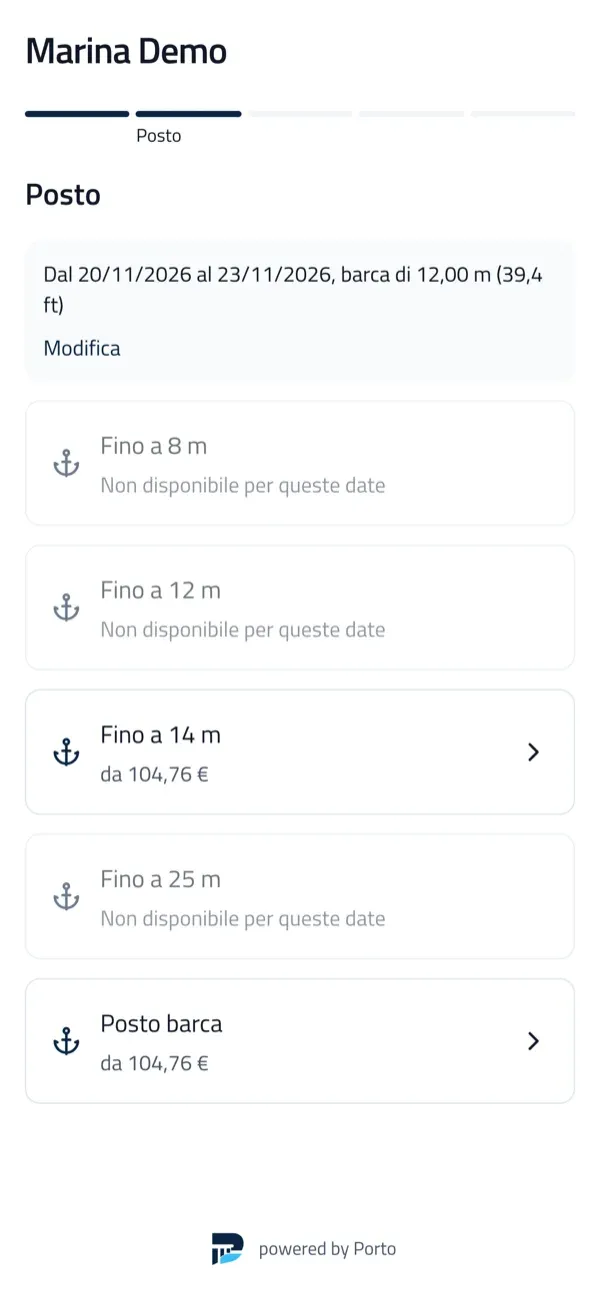
The boater enters dates and boat size, picks a berth category, sees the price from your price list and pays the deposit. No account needed.
  • On the marina’s website

    A widget with a one-line script or an iframe: WordPress, Wix, Joomla or any site. Or a direct link.

  • Paid to the marina

    Through your own Stripe account (card, wallets, SEPA direct debit) or by bank transfer and cash: no cut for the platform.

  • No double selling

    Across the desk, the online page and channels, guaranteed by the database; quotas of berths sold online.

  • Customer area

    Through an emailed link: bookings, documents, receipts, date changes and cancellation under your policy.

  • Public marina profile

    Location, contacts, VHF channel, services, transit prices and free berths by category, with no personal data.

  • Accessible

    The page, the widget and the customer area target WCAG 2.1 level AA, checked by automated tests.

The public booking page on a smartphone: choosing a berth category with the price for the given dates and boat size.
The booking page on a phone

Dock app

The dock app for mooring staff

The phone panel installs like an app, with screens for the dock, management, boatyard, dry storage and rentals. On the marina Wi-Fi it pairs with a QR code.
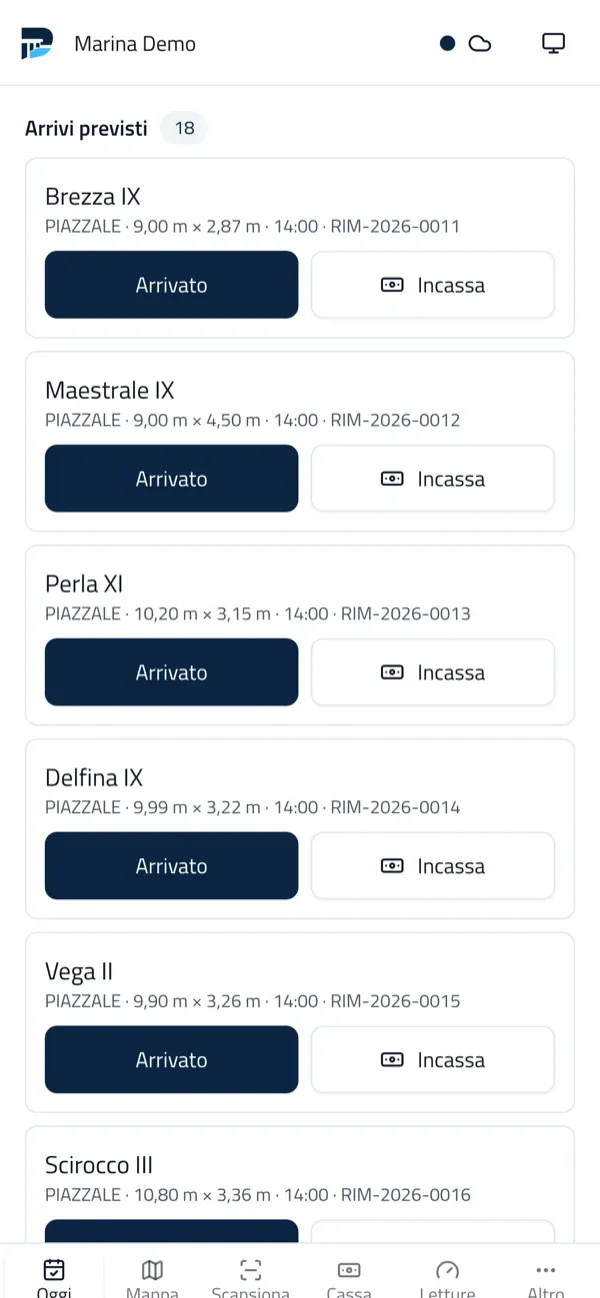
  • Arrivals and departures

    One tap to check a boat in or out and to collect payment on the pier.

  • Offline queue

    Arrivals, departures, photos, readings, hours and payments recorded without a network go out when it is back, with no duplicates.

  • QR pairing

    On the local network the phone connects to the office PC by scanning a QR code.

  • Roles

    Owner, management, office, accounts, dock staff, yard manager, yard worker, rentals, read-only.

The dock staff panel on a phone: today’s expected arrivals with Arrived and Collect buttons.
Today’s arrivals on the dock staff’s phone

Sensors

Occupancy sensors: they propose, the operator confirms

Porto receives readings from sensors and gateways with per-device keys and signatures, compares the physical state of berths with the expected occupancy and flags the differences.

  • Reconciliation and alerts

    The physical state of berths, with hysteresis, against the expected occupancy; alerts also show in the map’s Sensors lens.

  • No automatic changes

    Sensors never change contracts or occupancy without an operator’s confirmation.

  • Open protocol

    A documented protocol for sensor makers.

Reports

Reports and dashboard, compared across years

Physical and contractual occupancy, allocation efficiency, lost demand, customers and renewals, accrual-based production, charges, payments, receivables, cash desk, dry storage, boatyard, rentals and sensors.
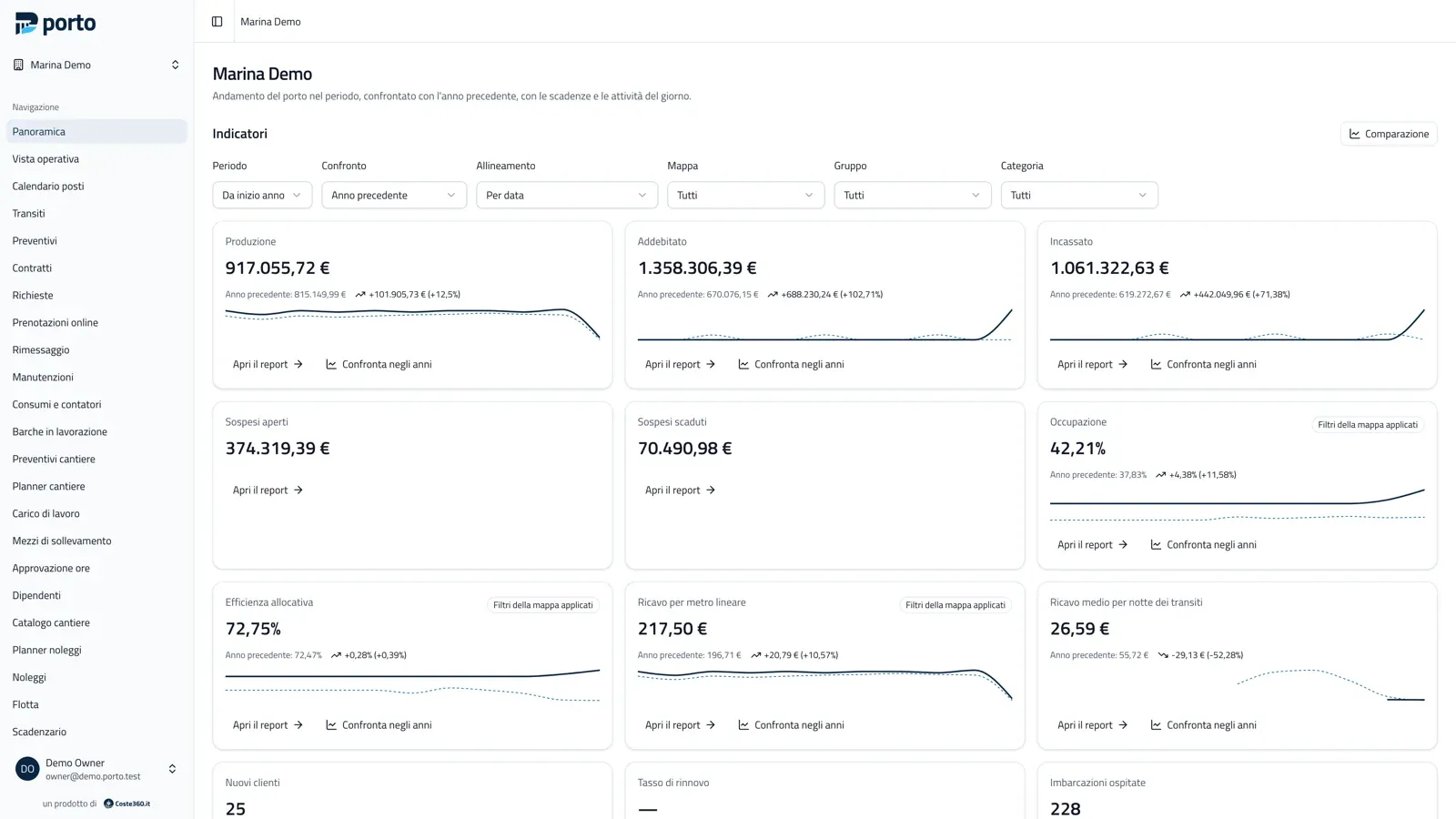
The manager’s dashboard: production, charged, collected, outstanding, occupancy and allocation efficiency compared with the previous year.
The dashboard compared with the previous year
  • From tile to detail

    Every tile opens the report behind it, with the same filters.

  • Up to 5 years

    Every indicator compares with previous years.

  • Exports

    Every report exports to CSV and Excel.

Desktop edition

Desktop edition: the marina runs even without internet

The app for Windows, macOS and Linux keeps the server and data on the office PC: no Coste360 service needed. Other PCs and phones share the same data over the marina Wi-Fi.

  • Backups

    Daily and on-close backups, restore from the panel; move to a server with one backup and one restore.

  • Remote and kiosk modes

    The app as a client of an online Porto, with a kiosk mode for the front desk.

  • Peripherals

    A bridge to ESC/POS receipt printers, ZPL label printers and QR readers.

  • Or on a server

    A Docker image with SQLite included or PostgreSQL, for online booking and several marinas in one installation.

Guide

How to use it, step by step

Read the manager’s guide

The manager’s guide explains every module with screenshots of the program. It is written in Italian.

docs.portomarina.app

Your next transit starts from the map.

Draw the marina once; contracts, transits and payments then work on it.

  • No subscription, no commission
  • Your data stays on your computer or server