Skip to content
Management software for marinas and boatyards, free and commission-free
For marinas, berthing points and boatyards

Free management software for marinas and boatyards.

A to-scale harbour map, mooring contracts and transits, online berth booking, dry storage, boatyard and rentals. Install it on the office PC or on your own server, and pay no subscription and no commission.

Windows, macOS and Linux · works offline · version 1.0.0 Source code

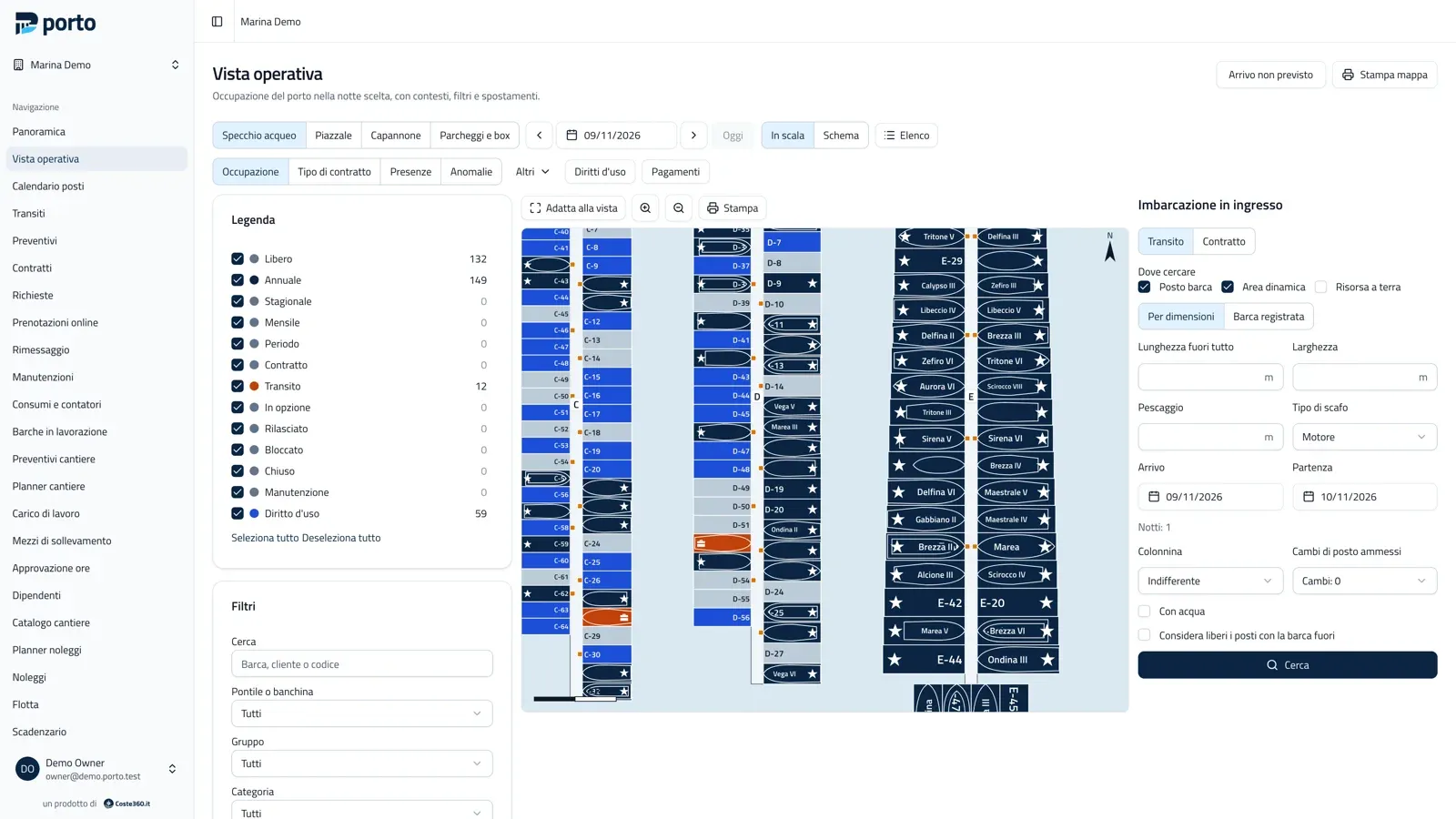
Porto’s operational view: piers C, D and E to scale, berths coloured by occupancy, the legend with counts and the berth search for an arriving boat.
The operational view of the chosen night: every berth and every boat to scale.

The video

See Porto at work

From the pier map to dry storage, from the dock to the office: how a marina works with Porto. Then try it in the online demo. The video is in Italian.

Online demo

Try the online demo

Walk into Marina Demo and try Porto in your browser, with nothing to install.

What you will find

Four maps with 350 berths, 250 customers, annual contracts and transits around today, dry storage, boatyard, rentals and sensors, all with made-up data.

Login details

Email
owner@demo.porto.test
Password
portomarina.app

The same password works for the other roles: director, office, accounting, dock, yard_mgr, yard, rental, viewer (always @demo.porto.test).

Open the demo

The demo is public and is reset every night: do not enter real data.

Why Porto

Your marina, your data. No subscription, no cut of your transits.

Subscription software keeps customers, contracts and payments on the vendor’s servers; a booking portal takes a commission on every transit. Porto runs on the office PC or on your own server, and boaters pay you directly.

Subscription software or commission portal

  • A yearly fee, often tied to the number of berths or users
  • A percentage of every transit booked online
  • Your data sits on the vendor’s servers
  • Getting it back depends on them

Porto

  • Free for the marinas, berthing points and boatyards you run directly
  • No commission: online payments go through your own Stripe account
  • Your data stays on your computer or your server
  • Export everything whenever you like, back up with one command

No artificial intelligence, no telemetry

Porto uses no AI services and no marina data goes to Coste360: the desktop app only checks whether a new version exists, and that can be turned off. Document data is entered by the operator.

Never two boats in the same space on the same night: the database prevents it, not a check that can be skipped.

Who it is for

One program, from the office to the dock to the yard

Berthing office

See the marina night by night, to scale.

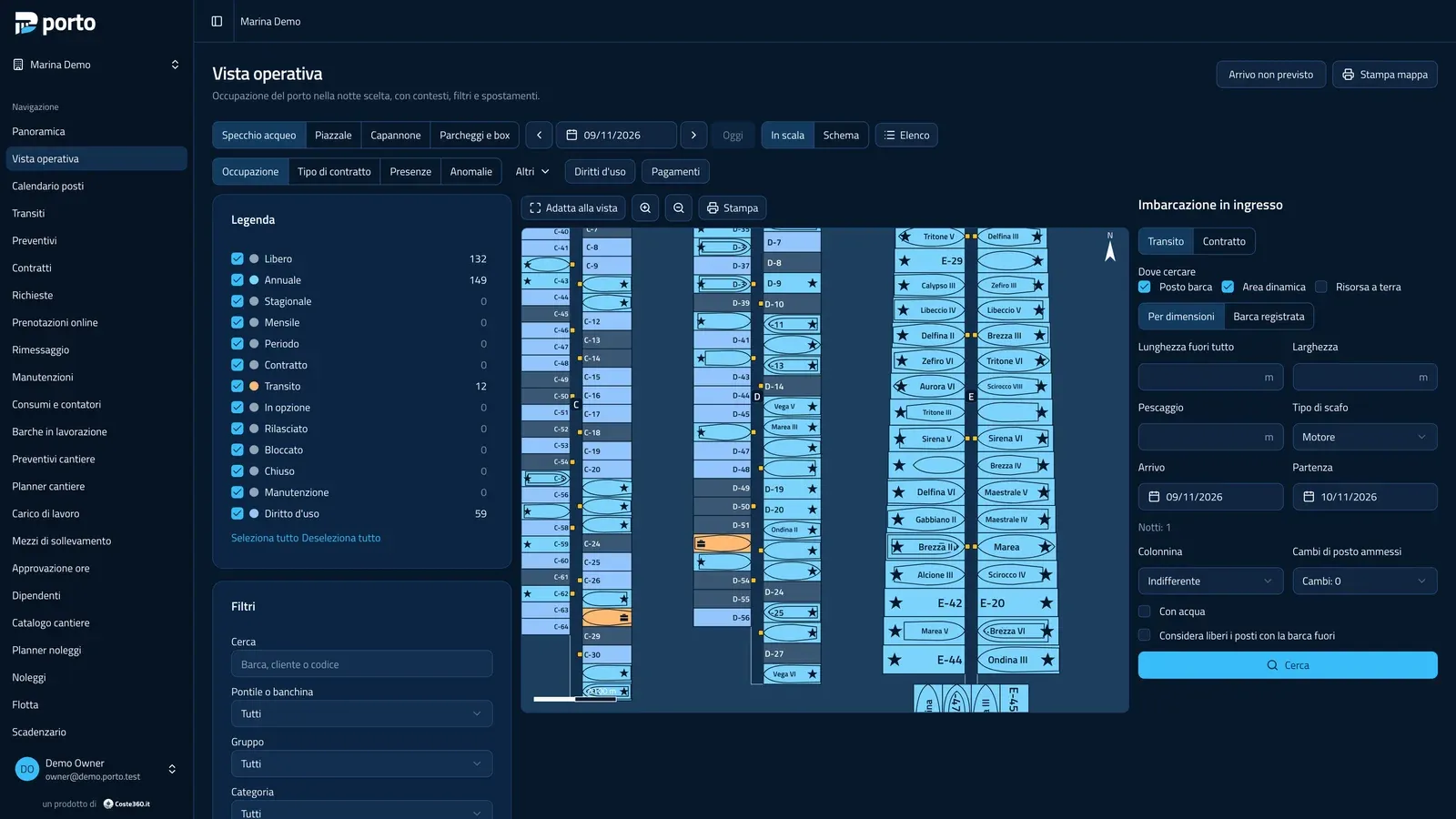
Every berth, pier and buoy field is measured in centimetres and every boat takes up its real footprint. Search a berth for the arriving boat’s dimensions, hold it as an option and confirm it: Porto checks that the boat fits and prices it from the price list. Light and dark themes, and the map prints.

The harbour map
Porto’s operational view in the dark theme: piers to scale with berths coloured by status, the legend and the berth search for an incoming boat.

Accounts

Charges and payments in order, invoices in your own software.

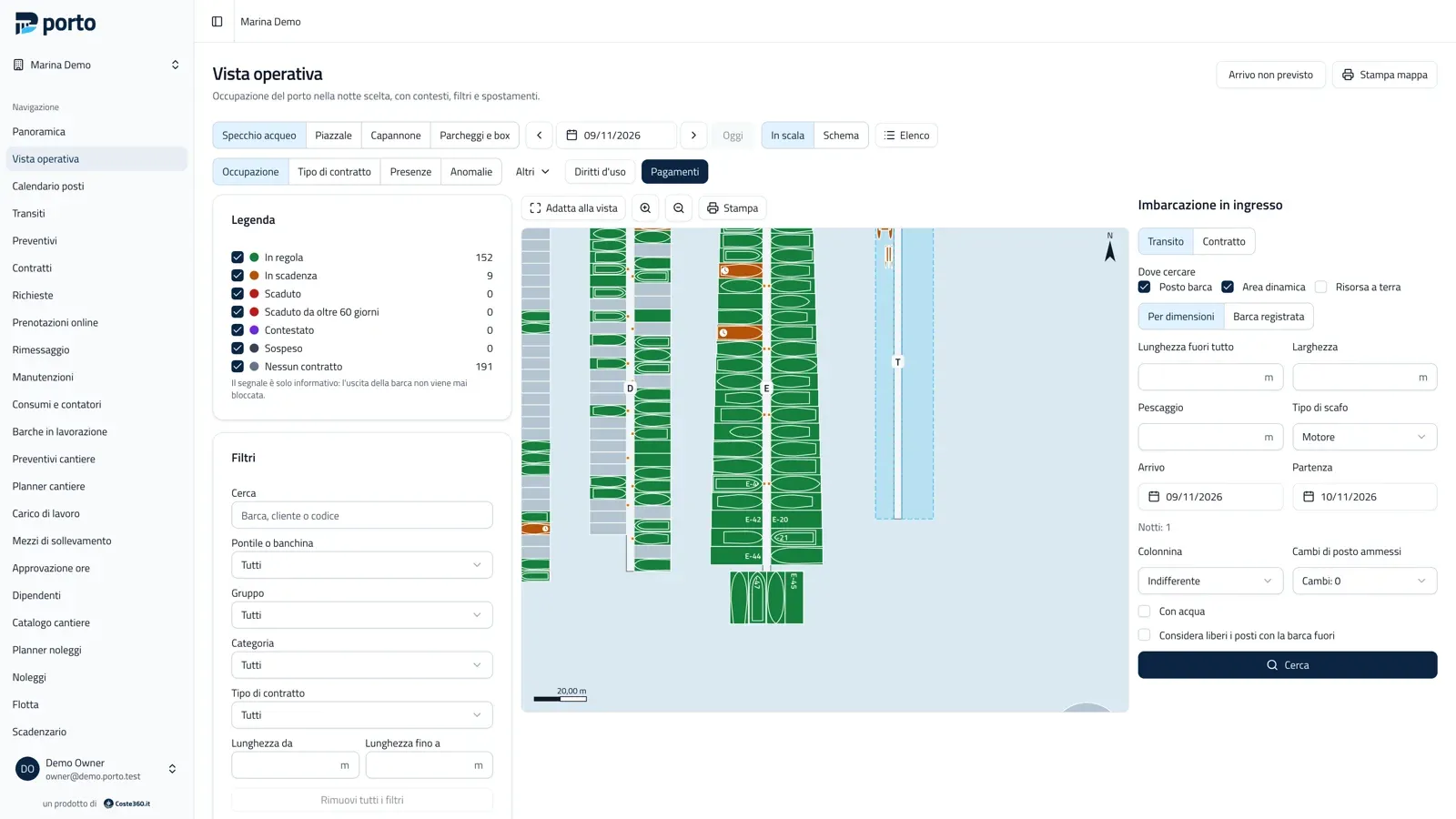
Contract instalments, transits, services, utilities, work orders and fees become charges, which you export “to invoice” as CSV, Excel or PDF for the invoicing software you already use. On the map, the Payments lens shows who is up to date and who is not.

Charges and payments
The harbour map in the Payments lens: berths coloured by the customer’s payment status, with the legend up to date, due, overdue and on hold.

Dry storage and yard

Sheds and yards to scale, and every boat leaves when it should.

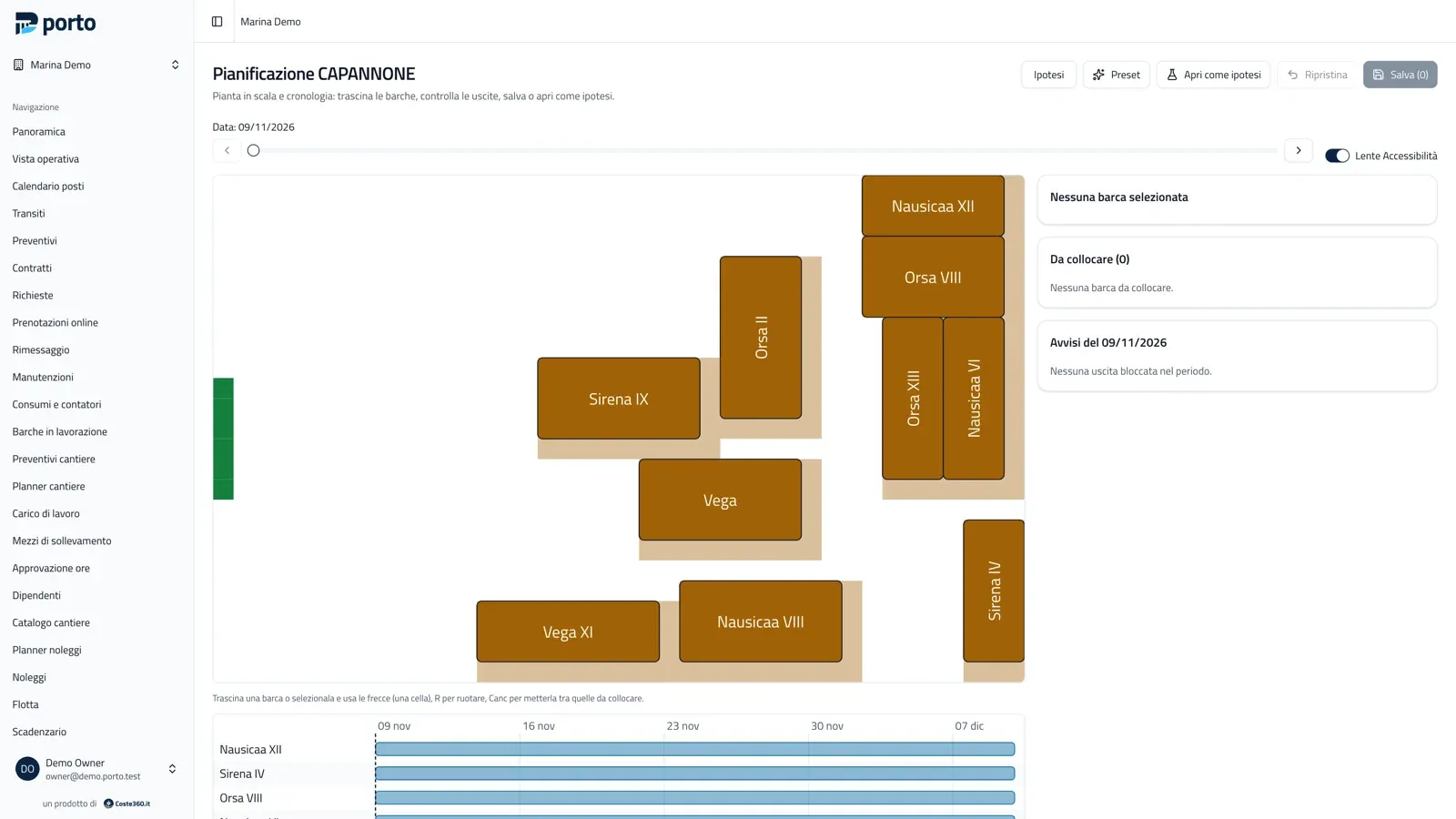
Place boats by dragging them on the shed plan, with the timeline below. The optimizer proposes a layout in which every boat can leave through the door on its planned day; you apply it or drop it. The boatyard has guided quotes, work orders and lifting equipment.

Dry storage and boatyard
Planning a dry-storage shed to scale, with boats placed on the plan, the exit accessibility lens and the timeline below the plan.

Management

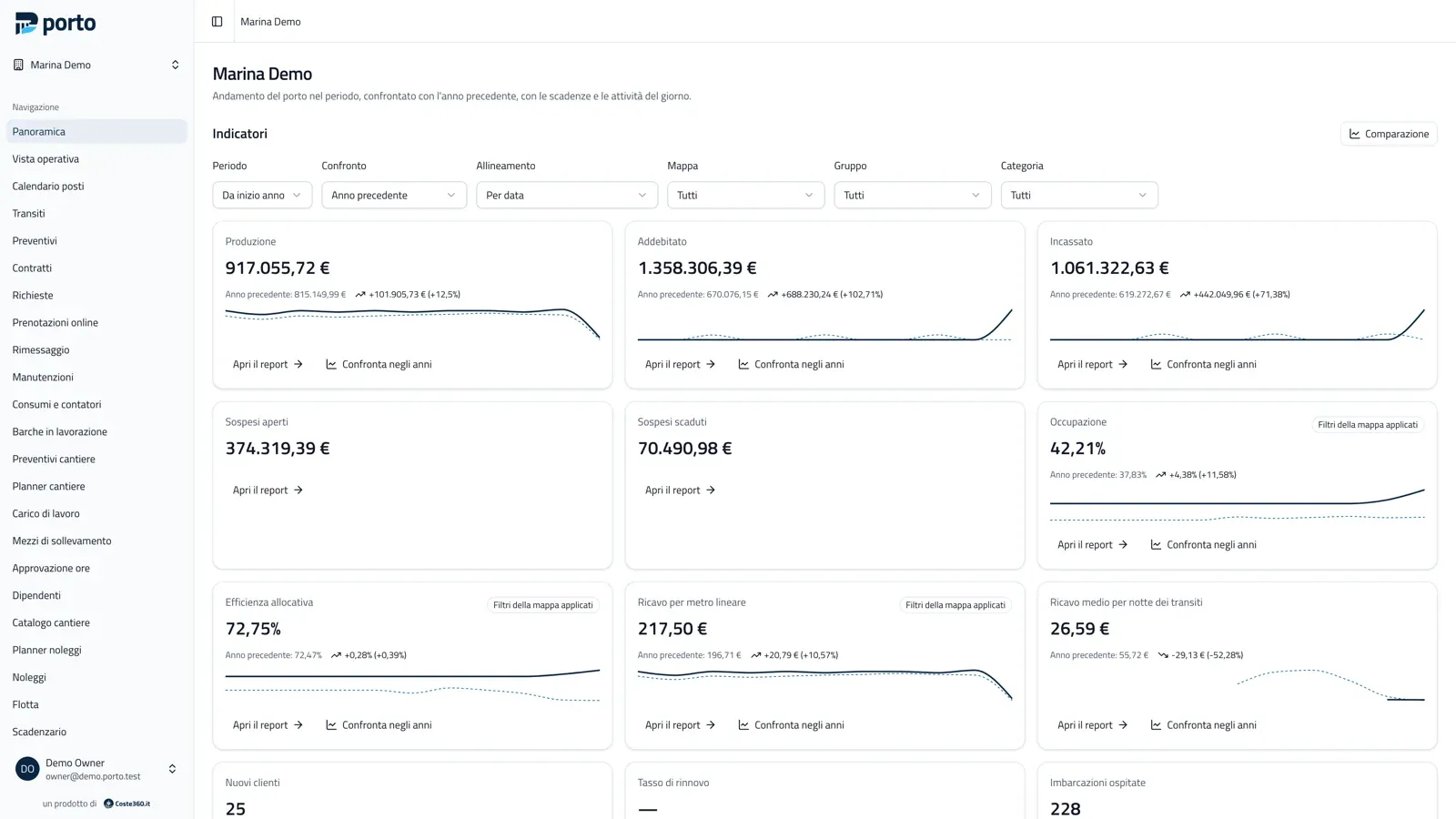
The marina dashboard, compared with last year.

Production, charged, collected, outstanding, occupancy and allocation efficiency, compared with the previous year. Every tile opens the report behind it, with the same filters, and its value equals the sum of those records.

Reports and dashboard
The manager’s dashboard: production, charged, collected, outstanding, occupancy and allocation efficiency compared with the previous year.

On the dock

Dock staff, boatyard and rentals work from their phones.

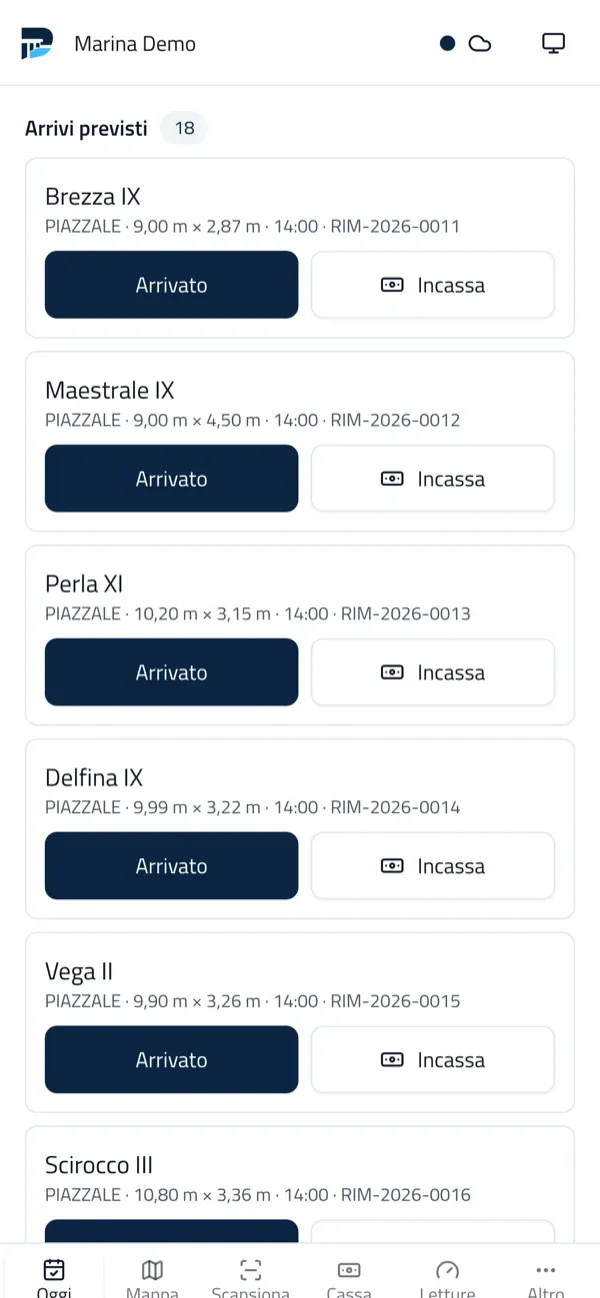
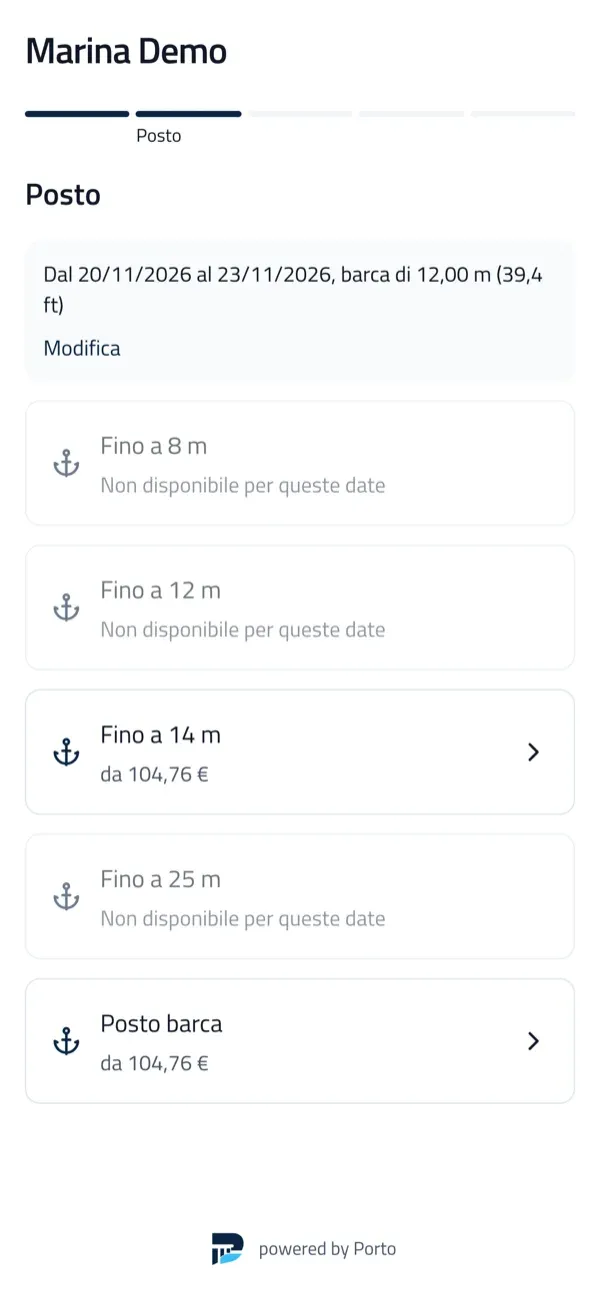
The panel opens on the phone and installs like an app. Dock staff check boats in and out and take payments on the pier; the yard logs hours; rentals handle handover and return. If the dock Wi-Fi drops, operations wait in a queue and go out when the network is back, with no duplicates. And boaters book their berth from their own phone.

Dock app
The dock staff panel on a phone: today’s expected arrivals, each with Arrived and Collect buttons.The public booking page on a smartphone: choosing a berth category with the price for the given dates and boat size.

Everything else

And everything else a marina needs

  • Price lists

    Periods, length bands, services, discounts and VAT; simulator and printable matrix.

  • Contracts and renewals

    From quote to signed contract, instalments and schedule, renewal campaigns.

  • Berth rights and common charges

    Holders and shares, transfers, apportionment tables and splits exact to the cent.

  • Rentals

    Fleet, skippers and rates; handover and return from the phone, with deposits.

  • Online booking

    A page and a widget for the marina’s website, no commission and no double selling.

  • Occupancy sensors

    Readings propose, the operator confirms: no contract changes on its own.

  • Several marinas

    One installation for several marinas, each with its own maps, price lists and users.

  • Works offline

    The desktop app keeps data and server on the office PC; phones join over the marina Wi-Fi.

All features

Getting started

From download to the first transit

  1. 1

    Install Porto

    The desktop app on the office PC, or the Docker image on your server if you want online booking. Installation guide (Italian)

  2. 2

    Draw the marina

    Piers, fingers, buoy fields and sheds with the generators, over an orthophoto or a site plan; or import berths from CSV. Manager’s guide (Italian)

  3. 3

    Set up the price list

    Periods, length bands and services: the simulator shows the price of every berth before you activate it. Manager’s guide (Italian)

  4. 4

    Open bookings

    If you like, the transit booking page goes on the marina’s website, with a deposit paid online. Manager’s guide (Italian)

Pricing

Free to download. If you like, we install it.

The same program either way, with every feature: only who installs it changes.

You install it

Porto on your computer or server

€0 for the marinas, berthing points and boatyards you run directly

  • every feature, no paid edition
  • no limit on berths, contracts or users
  • no commission on transits booked online
  • your data stays on your computer or your server

We install it

Assisted installation by Coste360.it

On quotation a service of the Coste360.it team

  • a verified installation, wherever you need it
  • map, price lists and online booking set up with you
  • support from the people who build Porto
FAQ

What marina managers ask

Is Porto really free?

Yes, for those who run their own facility. If you use it for the marinas, berthing points, boatyards or dry-storage facilities you own or run directly, there are no fees, no paid editions and no limits on berths, contracts or users. The only cost is the computer or server it runs on. A commercial licence is only needed to offer Porto to others as a service.

Does Porto issue e-invoices?

No. Porto computes and keeps the charges (instalments, transits, services, utilities, work orders, rentals, fees) and exports them “to invoice” as CSV, Excel or PDF for the invoicing software you already use; reconciliation then links the issued invoices to the charges. An exported charge never changes: every correction is a linked adjustment.

Is there a commission on transits booked online?

No. Online payments go through your own Stripe account and the money goes straight to you: you pay only the payment network’s fees, no percentage to the platform. You can also leave online payments off and confirm transits at the desk by bank transfer or cash.

Does it work without internet?

Yes. With the desktop app the server and data live on the office PC and no external service is needed; other PCs and the dock staff’s phones connect over the marina Wi-Fi. The phone panel queues arrivals, departures, photos, readings and payments recorded offline and sends them when the connection returns, with no duplicates. Only online booking, online payments and remote signing need internet, and so a reachable server. Installation guide (Italian)

All questions

For developers

One program, source code available.

A single Go binary with the admin panel, public pages and API inside. SQLite included, PostgreSQL if needed. Desktop app, Docker on a server or a mini PC on site, a REST API described in OpenAPI 3.1 and signed webhooks.

Your next transit starts from the map.

Draw the marina once; contracts, transits and payments then work on it.

  • No subscription, no commission
  • Your data stays on your computer or server